Add a Frontend Server
-
Navigate to UDP Config
Click on UDP Config from the left navigation menu. -
Click on the Add UDP Server button
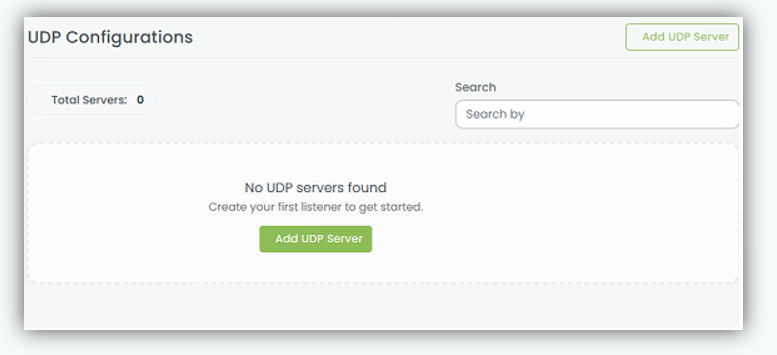
- The Add UDP Server configuration popup will appear.
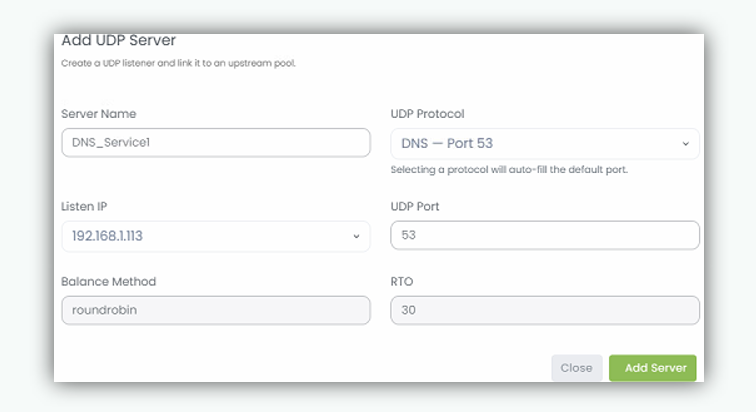
-
Enter Server Name. In the Server Name field, enter a unique and meaningful name to name to easily identify the UDP server. (Example: IPPhone_Service1, DNS_Service1)
-
UDP Protocol Select the required UDP service/protocol from the drop down list. This defines how data is transmitted over the network.
Example: DNS Service (UDP, Port 53)
-
UDP Port (optional) Specify the port number on which the service listens for incoming requests only if a non default port is required. By default, the port number is automatically populated based on the selected UDP protocol. Examples: 5000, 8080
-
Balance Method. By Default, all UDP traffic is distributed across backend servers using the Round Robin balancing method.i.e. Distributes incoming requests sequentially across all backend servers.
-
RTO (Retransmission Timeout) Define the time interval the system waits before retrying if no response is received. Example: 5 seconds (the system retries after 3 seconds)
-
After completing all required fields, click Add Server to create and apply the UDP server configuration.
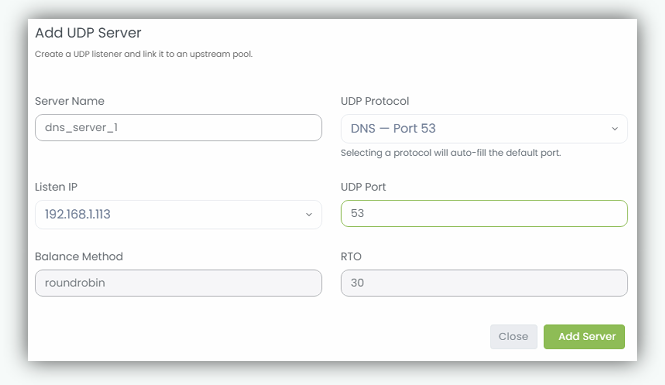
Server Entry (IP: Port)
Shows the main server IP address and port number. Example: 192.168.1.113: 53 This means the UDP server is running on IP 192.168.1.113 and port 53.
Upstream Represents the backend server group associated with this UDP server. It defines where the traffic will be forwarded. Example: dns_server_1_backend
Proxy Pass Indicates the upstream group to which incoming requests are forwarded. Example: dns_server_1_backend This means all incoming UDP traffic is routed to this backend.
UDP Listeners Displays the IP and port where the server is actively listening for incoming UDP requests. Example: 192.168.1.113:53
Upstream (Detailed View) Shows the linked backend configuration name again for clarity. Example: upstream (dns_server_1_backend)