Explicit Access to Admin URL
Overview
Explicit Access Control for Admin URLs is a security feature designed to protect sensitive administrative URLs (e.g. /ecp, /admin, /wp-admin) by restricting access based on client IP addresses. It allows administrators to block or allow access to admin specific URL paths while explicitly permitting access only from trusted IP addresses. This feature helps prevent unauthorized access to administrative interfaces such as control panels or management endpoints.
Configure Explicit Access to Admin URL
- Navigate to Policy.
Click on Policy from the left navigation menu.
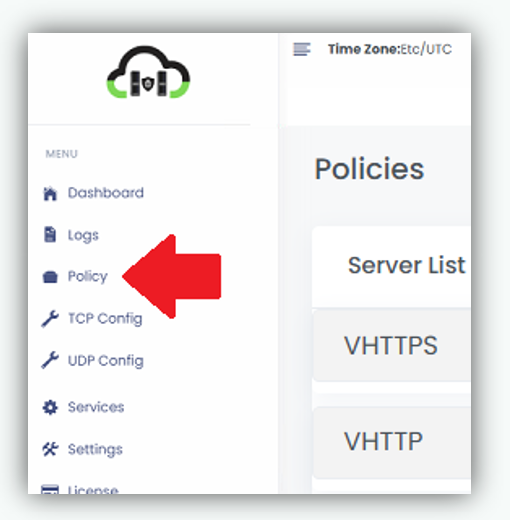
- Locate the required Frontend server from the list you want to configure the Explicit Access.
- Expand the required frontend server and locate the Block URL Except Few IPs option.

- Enter the admin URL suffix (e.g /admin) and IP address and click Block button. Example /admin and IP address 192.168.0.100 192.168.0.101

- The added URL and the configured allowed IP addresses will be listed below.
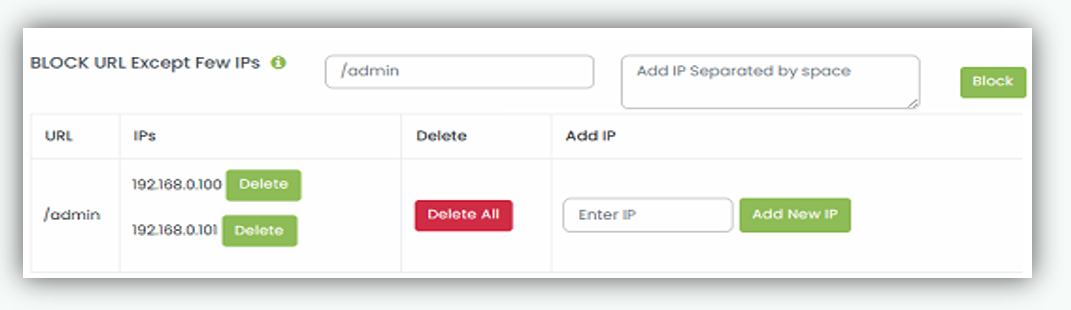
Once Explicit Access to Admin URL is configured/applied to the selected frontend server and begins restricting access to the specified admin URL, allowing requests only from the configured IP addresses and blocking all others.